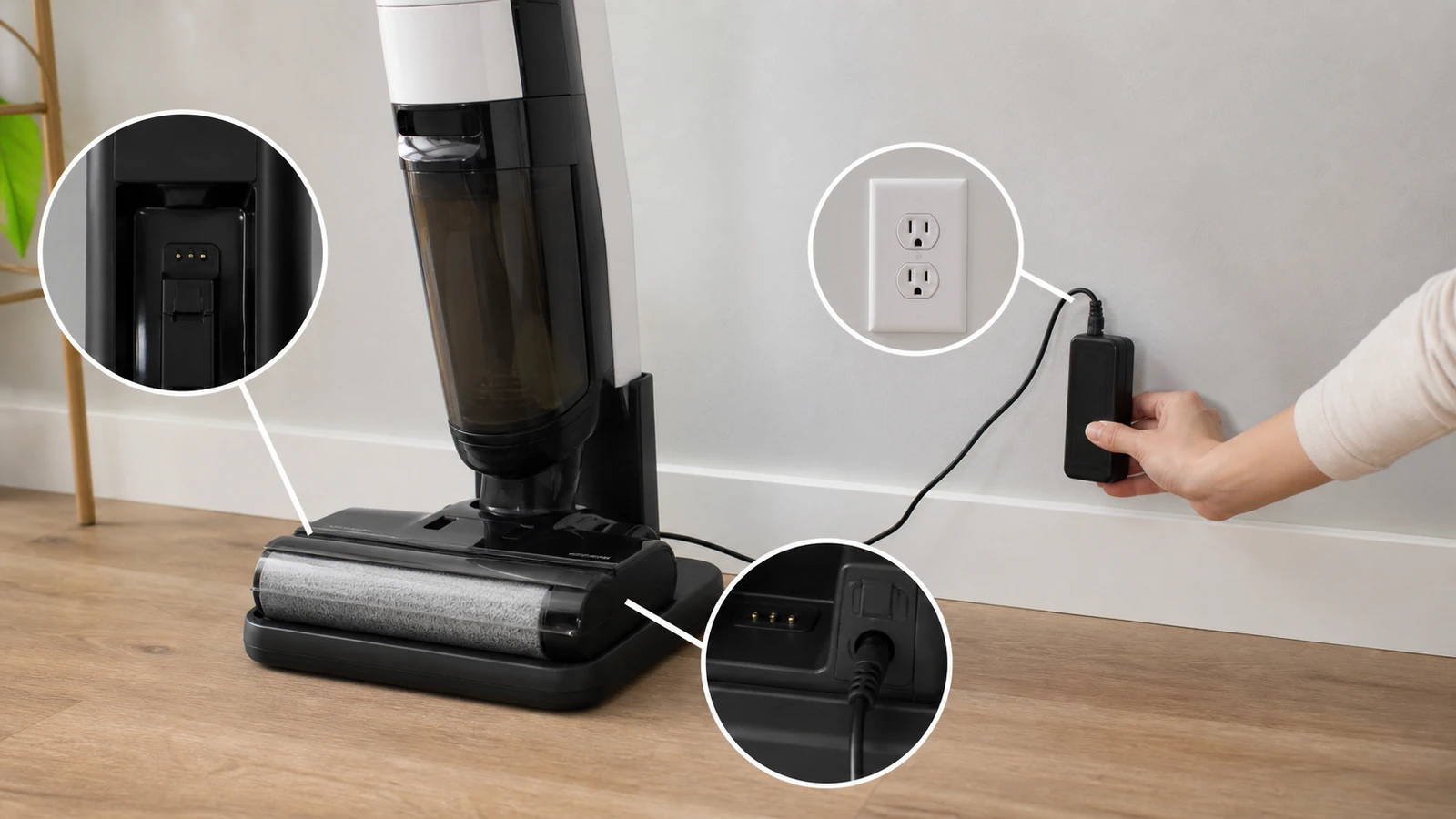
Quick Answer (TL;DR)
If your Tineco is not charging, the cause is almost always one of three things: the machine isn't making contact with the charging dock, the power source or adapter has failed, or the lithium-ion battery has entered protection ("sleep") mode after a deep discharge or temperature swing. Start by wiping the metal charging contacts dry, plugging the adapter directly into a known-good wall outlet, and leaving the unit docked for 4–6 uninterrupted hours. That sequence resolves the large majority of Tineco charging complaints without a service ticket.
If you're asking why is my Tineco not charging, you're in good company — it's the single most common support question for cordless wet-dry vacuums, and it's rarely a dead machine. Tineco floor washers combine water, electricity, and a sealed battery pack, so the charging path has several small points of failure that are easy to overlook.
This guide walks through all nine causes in the order a technician would check them: fastest and cheapest first, hardware replacement last. You'll also get a light-code reference table, a repair-vs-replace cost comparison, and the one diagnostic trick that tells you within 60 seconds whether you're dealing with a charger problem or a battery problem.
What Does "Not Charging" Actually Mean on a Tineco?
"Not charging" describes three different failures, and separating them saves you an hour of guesswork. On a Tineco, the symptom is either no charging indicator at all, an indicator that lights but never reaches full, or a full charge that drains within a few minutes of use.
Each points somewhere different:
- No light on the dock or handle → power delivery problem (outlet, adapter, contacts).
- Light comes on but never completes → interrupted contact, thermal throttling, or a degraded cell.
- Charges fully but dies fast → the battery is aging, not the charger.
How Tineco Charging Actually Works
A Tineco charges through spring-loaded metal contacts, not a plug you insert into the handle. The adapter feeds the dock, the dock passes current through the contact pins, and the onboard battery management system (BMS) decides whether it's safe to accept that current.
That last part matters. The BMS will refuse to charge if it detects moisture across the contacts, a cell temperature outside roughly 32°F–104°F (0°C–40°C), or a voltage reading it interprets as unsafe. So a Tineco that "won't charge" is often a Tineco that is deliberately declining to charge.
Why Is My Tineco Not Charging? The 9 Most Common Causes
Here are the nine causes ranked by how often they turn out to be the culprit, based on patterns across Tineco owner forums, retailer review complaints, and manufacturer troubleshooting documentation.
1. Wet or Dirty Charging Contacts
This is the number one cause, and it's free to fix. Detergent residue, hard-water mineral scale, and dust build a thin insulating film over the metal contact pins, and the dock can no longer pass current through it.
What to do:
- Unplug the dock from the wall.
- Wipe both the dock pins and the matching contacts on the machine with a dry microfiber cloth.
- For visible scale or green-white residue, use a cotton swab with a little isopropyl alcohol, then let it air-dry for 10 minutes.
- Re-dock and watch for the indicator.
Real-world example: A Floor One S5 owner who runs the self-clean cycle after every mop session will see residue build on the pins within about 6–8 weeks. If your unit charged fine for two months and then quietly stopped, clean the contacts before you do anything else.
2. The Machine Isn't Fully Seated in the Dock
A Tineco can look docked while sitting 2–3 millimeters short of contact. Thick rugs, uneven tile grout lines, and a dirty-water tank that isn't clicked in all the way all push the machine slightly out of alignment.
Move the dock to hard, level flooring. Push the unit down until you feel it settle, then confirm the charging indicator appears. If the light flickers when you nudge the handle, you've found your problem.
3. Dead Outlet, Switched Outlet, or a Tripped GFCI
Before blaming the vacuum, prove the outlet works. Many people charge a floor washer near a kitchen or bathroom, and those circuits are GFCI-protected — one nuisance trip and the outlet is dead while everything else in the room still works.
- Plug a lamp or phone charger into the same outlet.
- Check for a switch on the wall controlling that receptacle.
- Press Reset on the nearest GFCI outlet.
- Avoid charging through a cheap power strip or a travel voltage converter.
4. A Failed Power Adapter
The adapter fails far more often than the battery does. It's a sealed brick with no user-serviceable parts, and the cable flexes every time you move the dock.
Signs your adapter is the problem:
- The brick stays completely cold after 20 minutes plugged in (a working adapter runs slightly warm).
- Wiggling the barrel connector makes the indicator blink on and off.
- You can see kinks, pinch marks, or exposed strands near either end of the cable.
Buy the model-specific replacement. Tineco units use different voltage outputs across the iFloor, Floor One, and Pure One lines, and a mismatched generic adapter will either refuse to charge or trigger the BMS protection described below.
5. Lithium-Ion Battery Sleep Mode (Deep Discharge)
If your Tineco sat unused for months at a low charge, the battery may have self-discharged below the threshold where the BMS will accept current — a protective state often called sleep mode or over-discharge lockout.
The fix is patience, not force:
- Dock the unit and plug it in.
- Leave it for a full 6–8 hours without touching the power button. Pressing the trigger interrupts the trickle-recovery attempt.
- Check again. A recovering pack often shows no light for the first 30–60 minutes.
If there's still nothing after 8 hours, the pack has likely crossed the point of no return and needs replacement.
6. Temperature Protection
Tineco batteries won't charge when they're too hot or too cold. If your dock lives in an unheated garage in winter or a hot sunroom in summer, the BMS simply blocks charging until the pack returns to a safe range.
Bring the machine indoors, let it sit at normal room temperature for 60–90 minutes, then retry. Also give the unit 20–30 minutes to cool after a long mopping session before docking — charging a warm pack repeatedly accelerates capacity loss.
7. The Dirty Water Tank or Brush Assembly Isn't Locked In
On several Tineco floor washers, safety interlocks stop normal operation when the dirty-water tank, filter, or brush roller isn't seated correctly. Owners often read the resulting no-response state as "it won't charge."
Remove the tank, empty and rinse it, confirm the filter is in place and dry, and reinstall until it clicks. Then re-dock.
8. Firmware Glitch or a Stuck Controller
Sometimes the electronics just need a reset. A soft reset clears a hung charge-controller state without erasing anything.
- Unplug the adapter from the wall.
- Remove the machine from the dock.
- Hold the power button for 10–15 seconds to bleed residual charge.
- Wait 5 minutes, then reassemble and plug back in.
If your model supports the Tineco app, check for a pending firmware update once it's charging again.
9. Genuine Battery End-of-Life
Tineco lithium-ion packs are typically rated for roughly 500 charge cycles before noticeable capacity loss. For someone mopping twice a week, that's around three to four years of normal service.
End-of-life signals:
- Runtime drops from ~35 minutes to under 10.
- The unit charges to full in a suspiciously short time.
- It shuts off abruptly instead of fading.
- The pack feels warm even when idle.
Tineco Charging Light Codes: What Each Indicator Means
The indicator ring is your fastest diagnostic. Patterns vary slightly by model, so confirm against your manual — but this table covers the common behavior across the Floor One and iFloor lines.
| Indicator behavior | Most likely meaning | First action |
|---|---|---|
| No light at all when docked | No power reaching the machine | Test outlet, then clean contacts |
| Slow "breathing" pulse | Charging normally | Wait — do not interrupt |
| Solid light, then off | Charge complete | Nothing needed |
| Rapid flashing | Fault: temperature, moisture, or blockage | Dry contacts, let unit reach room temp |
| Light appears then dies within seconds | Poor contact or failing adapter | Re-seat unit, test a new adapter |
| Charges but runtime is minutes | Battery capacity loss | Plan a battery replacement |
How Do I Know If It's the Charger or the Battery?
Use the substitution test: if a known-good adapter produces a charging indicator, your old adapter was the problem; if a fresh adapter still produces nothing after 8 hours docked, the battery or internal charge board is at fault.
Here's the 60-second version most people miss — feel the adapter brick after 15 minutes. A functioning adapter under load warms up noticeably. A brick that stays room-temperature is either dead or not being asked for current, which narrows the problem to the adapter or the outlet, not the battery. It's crude, but it correctly sorts the two failure classes most of the time.
Repair vs. Replace: A Quick Cost Comparison
| Scenario | Typical fix | Rough cost | Worth it? |
|---|---|---|---|
| Dirty contacts | Clean with alcohol swab | $0 | Always |
| Failed adapter | OEM replacement adapter | Low | Yes |
| Sleep-mode battery | 8-hour recovery charge | $0 | Always try first |
| Aged battery, unit under 3 years | Replacement battery pack | Moderate | Usually yes |
| Aged battery, unit 5+ years out of warranty | New machine | High | Compare against a new model |
How Long Should a Tineco Take to Charge?
Most Tineco floor washers reach a full charge in about 4 to 5 hours from empty, and deliver roughly 25–40 minutes of runtime depending on model and suction mode.
If yours is still not full after 8 hours, treat that as a fault — not slow charging. A healthy pack follows a predictable curve; an unhealthy one plateaus.
Common Mistakes That Cause Tineco Charging Problems
Most charging failures are habits, not defects. Avoid these five and your battery will last significantly longer:
- Docking the machine while the contacts are still damp after self-cleaning. Give it a wipe first.
- Storing it at 0% for weeks. Leave lithium-ion packs near 40–60% for long storage.
- Charging in a freezing garage or a hot patio. Room temperature only.
- Using a generic third-party adapter with the wrong voltage output.
- Yanking the machine off the dock by the cord side, which slowly bends the dock pins out of alignment.
When to Contact Tineco Support or Claim Warranty
Contact Tineco support if the unit shows a rapid-flash fault code that survives contact cleaning and a full reset, if the battery is swollen or the housing feels hot, or if it fails to charge with a confirmed-good adapter.
Have your model number, serial number, and proof of purchase ready — Tineco warranty terms vary by region and retailer, and battery coverage is often shorter than the machine's overall warranty.
Stop DIY immediately if you see a swollen pack, smell anything acrid, or notice discoloration around the battery housing. Damaged lithium-ion cells are a fire risk and should be recycled at a proper battery drop-off, not thrown in household trash.
Key Takeaways
Key Takeaways
- If your Tineco is not charging, check the contacts, the outlet, and the adapter — in that order — before suspecting the battery.
- Dirty or damp charging pins are the single most common cause and cost nothing to fix.
- A deeply discharged battery can look dead; leave it docked and untouched for 6–8 hours before giving up.
- Tineco batteries refuse to charge outside roughly 32°F–104°F, so garage and sunroom storage causes false failures.
- An adapter that stays cold after 15 minutes is almost certainly dead or not drawing current.
- Charges fully but dies in minutes = battery wear, typically after ~500 cycles or 3–4 years.
- Swelling, heat, or burning smells mean stop troubleshooting and contact support.
Frequently Asked Questions
Why is my Tineco not charging even when it's plugged in?
Usually because current isn't reaching the battery, not because the battery is dead. Dirty contact pins, a misaligned dock, a tripped GFCI outlet, or a failed adapter block the charge path. Clean the pins, test the outlet with another device, and re-seat the machine firmly.
How do I reset my Tineco vacuum?
Unplug the adapter, lift the machine off the dock, and hold the power button for 10–15 seconds to discharge residual power. Wait five minutes, then reassemble and plug it back in. This soft reset clears most stuck charge-controller states.
Hey Google, how long does a Tineco take to charge?
Most Tineco floor washers charge fully in about four to five hours from empty. If yours isn't full after eight hours, that's a fault — check the contacts and adapter rather than continuing to wait.
Why does my Tineco die so fast after charging?
That's battery capacity loss, not a charging failure. Lithium-ion packs lose usable runtime after roughly 500 cycles, so a three-to-four-year-old unit dropping to under 10 minutes is behaving normally. A replacement battery pack restores full runtime.
Can I just buy a new battery for my Tineco?
Yes, for most models Tineco sells model-specific replacement battery packs. Always match the exact model number, and buy from Tineco or an authorized seller — off-brand packs can trigger the battery management system and refuse to charge.
Is it bad to leave my Tineco on the charger all the time?
No, the built-in battery management system stops charging once the pack is full, so continuous docking is safe. That said, avoid leaving it docked in a hot or freezing space, since temperature extremes shorten battery life faster than the charging itself.